This is a guest post by Lulugirl896 of Mobigasmic – an awesomesauce blog about mobile gadgets and technology!
In the relatively small playing field of Windows Mobile applications for Twitter, there is a world of opportunity for a developer to come up with a top dog. And lately it seems that quite a few are trying to do just that.
One of the most recent attempts is Twobile, which is still in beta. The first thing I noticed about Twobile is its small size- about 200k compared to the 500k of say, TinyTwitter. This is a good thing, as it lends itself to being installed in the main memory, which in turn means you are more likely to keep it ‘always-on’, and readily available for the next use.
If I had to use one word to describe the interface for Twobile in its current state, it would be ‘busy’. It offers a lot of features, but each view is in a separate tab, and as you move to each tab it performs an update which delays it by a few seconds. I couldn’t figure out how to navigate around using just my hardware buttons, resulting in the dreaded stylus-poking to move from tab to tab.
When you open the application, you are greeted by a screen that contains your most recent tweet:
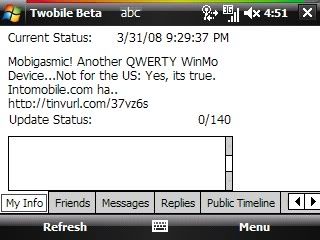
I would prefer to launch and be able to get a quick overview of my friends’ most recent tweets instead. But, it does include a window for you to update your status (I.e. Enter a Tweet) so I guess this is also a useful launch page.
As I mentioned, everything is tabbed in Twobile, so to view your friends’ tweets, you’ll need to move to that tab. The layout is in a one line summary form, which saves screen real-estate by allowing you to see more lines of tweets than you ordinarily would:

Selecting a line opens up the complete tweet and includes the avatar and name of the author

To see a friend’s complete timeline, you select their name from a drop-down menu;

In its current form, its hard to see how Twobile is going to be ported to non-touchscreen devices. There is entirely too much navigation needed. In lieu of auto-refresh options, the application refreshes as you move from tab to tab. Twobile also a tray option to remain easily accessible from your today screen, and auto-launch at startup, but without auto-refresh these aren’t very useful options.
The good news is that Twobile is in early beta, and is being developed by a creator who seems keen on user input. Early adopters willing to give it a try and provide feedback should definitely give this one a try. You can find download and support information at http://www.infinitumsoftware.com/twobile My best advice for the makers of Twobile is to remember that the beauty of Twitter lies in its sheer simplicity. Any application that hopes to thrive needs to mirror that ease of use as well.