
 There have been numerous links I’ve come across while on my iPhone that if I didn’t read it in Tweetie, Tweetdeck, or any other Twitter client on my iPhone, it won’t be shared because I can’t retweet it. Not that I don’t want to. It’s impossible to do. Squeezer is about to change all of that (and 50 million iPhone apps will soon follow suit). Squeezer is a recently released iPhone app that does what many have been waiting on more dedicated mobile Twitter clients to do: shorten links on the fly. Note: I’m not aware of any other link shortener apps for the iPhone. If you do, please leave a message in the comments. Thank you. It’s also really easy to use: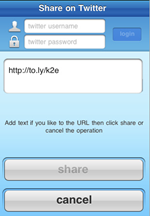
- Copy your link from Safari (or wherever you can copy)
- Paste in Squeezer
- Select a URL shortening service (Bit.ly, To.ly, Is.gd, Tr.im)
- Squeeze it
- Share to Facebook, Twitter, SMS, or email
This might seem like a lot of steps, but trust me, it’s a really quick process. Kudos to the design team also because I love looking at this app. It makes me want to shorten links just because, but I won’t (for now). 
- What link shorteners are you using for the iPhone?



I use http://ki.tl/ http://f1.tl and http://hc.tl
If you're retweeting, you're probably in your Twitter app already & don't need this.
If you're someplace else, just pop into your Twitter app and shorten it.
Why take up an app slot for this? It seems like a solution in search of a problem.
If you're retweeting, you're probably in your Twitter app already & don't need this.
If you're someplace else, just pop into your Twitter app and shorten it.
Why take up an app slot for this? It seems like a solution in search of a problem.
Thanks For Sharing.
I'll try it out.
cardy ugg boots
cardy ugg
cardy uggs
classic short ugg
classic short uggs
ugg classic short
ugg bailey button
women's bailey button
bailey button ugg
Women's UGG Sundance II
UGG Sundance II
ugg sundance
ugg boots, boots, ugg uk, ugg australia, uggs, ugg boots, uk ugg shoes, ugg sale, cheap ugg, knitted ugg boots, ugg cardy boots, ugg cardy, ugg boots sale, ugg slippers emu boots, emu cheap ugg, ugg.co.uk, uggs boots, uggs uk sale, 90% off ugg, cheap nightfall ugg, b outback ugg, pink cardy, ugg boots sale, ugg boots in the short, black uggs, 6 ugg boot, bailey butto ugg boots, bailey butt, ugg boots on sale, ugg boots, ugg cardy, ugg uk sale, ugg classic, good ugg boots, ugg sandals, ugg sale, ugg uk, ugg.co.uk, uggs on sale, uggs on sale comments, ultra tall ugg boots, sale ugg boots, sales uggs bailey but, shoe sale ugg classic, ugg, ugg argyle knit, ugg australia sale, ugg bailey button rev, ugg black leather, ugg boots australia, ugg boots in the uk, ugg boots uk sale, ugg classic argyle re, ugg halendi sale, boots insoles nz, children ugg boot re, kids blue cardy ugg b, knitted ugg boots sal, men ugg boots uk, men ugg boots uk, mens ugg sale,cheap uggs, ugg classic, ugg flip flops, flip flops, baby ugg, ugg uk, ugg bailey button boots, uggs boots, uggs cardy, ugg uk, ugg sale, uggs sale, ugg cardy sale, uggs on sale, bailey button, ugg cardi, ugg shoes, uk ugg sale, white uggs boots, black uggs boots, ugg for sale, cardy uggs, ugg crochet, ugg bailey button,
Hey Corvida!
Great review.
I just wanted to let you know that we recently too contacted iDevCode (the developers) about including support for our own URL shortening service RFly.Me (http://rfly.me). They accepted, and we'll be added in the next upcoming update to the application.
The update has already been submitted for review.
Cheers,
Arron
RFly.Me
Tweetdeck for iphone has a link shorterner built right in. It's the first icon to the lower right in the “new tweet” window
Twittelator pro allows for link shortening, they have for some time.
Man, just use a bookmarklet in Safari – every url shortener has something like that… no need for a separate app!
Did you say tr.im?
If you use the Tweetie bookmarklet in Mobile Safari, the URL of the page gets dumped into Tweetie and shortened instantly, then you have the chance to type in your message too. It doesn't share to Facebook or SMS though, so Squeezer has an advantage there. Do you know if you can set up a bookmarklet with Squeezer too?
I use Smub: http://smub.it/
I use a the is.gd bookmarklet which instantly displays the shortened url which can be copied and pasted with ease.