Have you heard of Dipity? I hadn’t either until today. Dipity recently came out of private beta to a full launch last week. What is Dipity? Dipity allows you to create a timeline out of your lifestream. Though some users may glance over the service, it’s really worth a look. It’s not trying to be the next Friendfeed and has many features to help it stand out in an already saturated crowd.
Kudos to Jeffisageek for pointing this service out!
Timeline of Feeds
Your timeline is made out of feeds or your user account with Picasa, Twitter, Pandora, WordPress, Last.fm, Flickr, Yelp, Blogger, and Youtube. This is a relatively small amount of services to stream, which is why you have the option of adding numerous RSS feeds. You can also add events to a timeline, images, a Google map, a link to another site, and even Youtube videos!
A Plethora of Views
Once you’ve added your feeds you can take a look at your stream in four different views: timeline, list view, flipbook, and map view.
Timeline
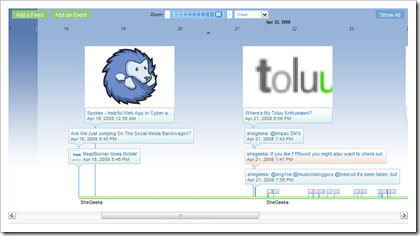
Here you can see a visual timeline of everything that you’ve added based on the time an item was published. There’s a zoom feature that allows you to zoom in and out of your timeline by day, month, or years. The longer the length of time, the smaller your timeline view will become. Here’s a look at the ‘Week’ view.
List View
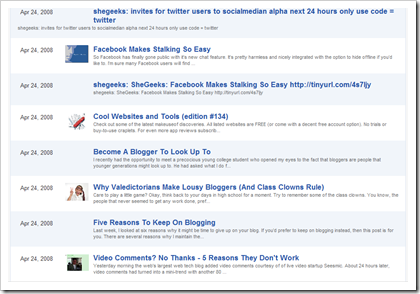
This is a personal favorite of mine. The list view is simple enough and reminds me a lot of partial RSS feed views. There’s nothing particularly special about this view, but users can appreciate the simplicity of it after being in the timeline view long enough.
Flipbook
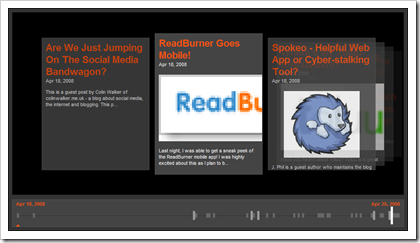
The Flipbook view is very nice, but stutters a bit in Firefox. Clicking on the blocks at the bottom will allow you to ‘flip’ through your stream.
Map View
Powered by Google, the map view would be a neat tool for users that have items that are geo-tagged, or tagged with a location. This is also more suited for events that you may add to your stream rather than the feeds you may be adding.
A Host Of Features, A Solid Product
Other features include timelines that can be embedded and shared, and previewing an item. Click on an item in the timeline view and you’ll get a pop-up preview of the item, which is a really neat feature for blog posts that are shown in your stream. You can read the entire post right from Dipity. However, if you want to add a comment you have to head back to the original post. Smart move Dipity. :)
Dipity is a really cool visual lifestream service and has a host of other features that you’d simply be better off seeing for yourself. They’ve put a spin on lifestreaming with the integration of viewing your lifestream in different displays. You can also create more than one timeline, which would be fantastic for sharing feeds in groups, like Reddit Elite. This is something to keep an eye on and I’d love to hear your thoughts about it.