 As the new school year begins, you might be wondering how else can you use your computer to manage your studies. It seems like Microsoft Office is the only reason for a student to devote any of their PC time to school. This was once the the doomed outlook of another school year for me. Thank to the web, there are hundreds of tools out there to make school more interesting and help you manage all the projects that are sure to come your way. Here are my top 9 picks for managing and collaborating school work in and out of the classroom.
Google Docs
 Collaborating on group projects can be easier with Google Docs. Students can create:
- Documents
- Presentations
- Spreadsheets
- Forms
- Drawings
All of the media create can be set for private or public use at any time. Adding members to documents is as simple as entering an email address. This collaborative writing web app allows students to work in real-time, any time. This means you’ll see instant updates to documents without the need to re-upload or save multiple versions of your documents (though I recommend keeping backups). In fact, you can see the revision history of any document in just two clicks to see how things are changing. Gmail users can also move documents from their inbox to Google Docs with a click.
Google Calendar
 Is my organizer of choice for sticking to schedules and changing them when necessary. Google Calendar is configurable for organizing multiple calendars in one account. Now students can see their classes separately or combined in one click. Google Calendar could also benefit students keeping track of specific activities like track meets, basketball games that require flexible scheduling tools.
Documents-To-Go
 When going mobile, iPhone and Android toting students have a massive platform of apps to help with their studies and others may not be so lucky. Documents-To-Go is a mobile word processor compatible with just about every student handset, even an old BlackBerry Curve or Palm Treo. Work on papers and review PowerPoint presentations or PDFs no matter where you are with this mobile app. Just remember to charge your phone because Documents-To-Go could get addictive.
Dropbox
 Dropbox describes itself like a “magic pocket”. When documents, images, and video clips are spread across numerous classmate’s laptops or friend’s phones, Dropbox can consolidate the files and make them available across all of those platforms. Just like a “magic pocket” your files are always there. Dropbox syncs and backs up the file locations you set. Instead of emailing files to yourself, simply add a folder to Dropbox and it will automatically update when any changes are made. Dropbox hosts your files and folders, while giving you access to your backups from a variety of mobile devices. It certainly eliminates the hassle of USB drives.
Evernote
 Asking your brain to remember everything is like asking your mom for money: you might get some, but not as much as you’d like. Enter Evernote, a web app that remembers everything for you. Evernote supports the importing or capturing of:
- Text
- Pictures/Scans
- Web Clips
- Videos
- Audio
Information can be sent and accessed through Evernote from any computer or phone. It’s completely searchable, meaning Evernote will even find the text in images and handwritten notes that you save. See it, save it in Evernote, and keep it moving. One classroom’s response has been overwhelmingly positive about Evernote. College Hack has a great post on using Evernote to manage your digital note.
Bibme
 Bibme is one of the few remaining online web tools that will format those pesky bibliographies automatically. Best of all, it’s free! Bibme supports a variety of format styling for citations including:
- MLA
- APA
- Chicago
- Turabian
Bibme has a built in search feature that will let you search for your citation also. While there’s no guarantee that you’ll find rare sources, Bibme can be a time-saver for popular work citations. You can download your citations or even save them, though both require an account with Bibme, which makes sense if you’ll be using it the entire school year.
*Bonus: Bibliography Citations In Microsoft Word
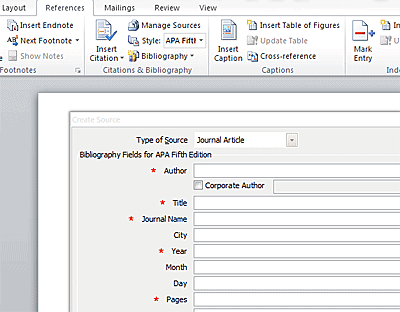
If you’re using Microsoft Word 2007 or later to write up your documents, there is a neat Citations & Bibliography section located in the Reference tab. In this section you can use Microsoft Word to manage your bibliography citations and appropriate styles.
Extra Credit
- What other web apps have you found useful throughout the school year?
- What management tools have you heard about?
- How do you keep group projects open and fun?