As we increase the number of people we follow on Twitter, we also increase the volume of information, aka noise, that flows into our Twitter timelines. Pruning my following for fresh, relevant and insightful information is a tedious and time-consuming job that I only have the heart to do once a month.
In between time, I use these tips to keep the noise level down in my Twitter timeline.
Turn Off Retweets
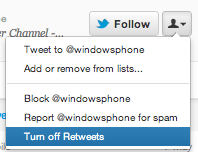
When you follow someone on Twitter, you automatically opt-in to see their retweets (RTs). These tweets they share from other Twitter accounts, which can be useful for gaining exposure to new people and ideas on Twitter. However, some folks can take retweeting too far and re-share everything in their timeline or just may not retweet content you’re interested in seeing.
Thankfully, Twitter gives you an option to turn retweets on and off for the people you’re following. To turn retweets off, visit the person’s profile page, tap the person icon and select “turn off retweets” from the drop down on a user’s profile (next to the follow button).
Use Twitter Lists
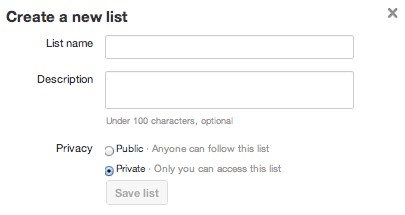 Another way I keep the noise down is by using lists. Maybe you know someone that you like, but aren’t interested in what they tweet. Add them to a Twitter list instead of following them. With Twitter list, you can stay connected, but only see their tweets when you check the list their in.
Monthly Cleanup
Once a month I use ManageFlitter to clean up my Twitter following. I unfollow people who haven’t tweeted or followed me back after more than two months. Sometimes I’ll move them to a list. Either way, follower management tools like ManageFlitter can help keep the noise down on Twitter.
Automatically Unfollow (in Bulk)
If you’d rather automate a cleanup of your Twitter following, check out apps like TwitQuit that let you set parameters to automatically unfollow/follow people after a period of time or when they follow/unfollow you. If you have a mass following it’ll be easier if you use bulk unfollow tools like this to cut the noise down.
What Would You Do?
Have you mastered the art of keeping the noise in your Twitter Timeline to a minimum? Let me know what tips, shortcuts, apps, and hacks you’re using to keep the most relevant tweets coming!